Article: How to Print Photos on Fabric for Memory Quilts
How to Print Photos on Fabric for Memory Quilts
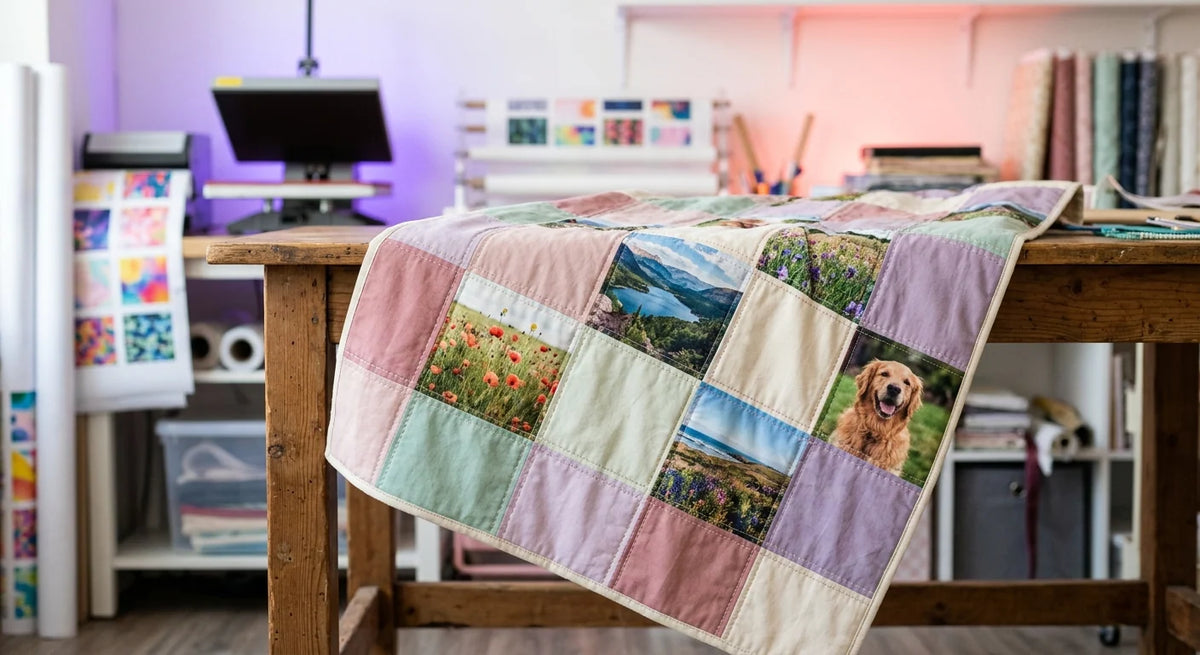
A memory quilt carries the photos a phone gallery never does justice to: the wedding portrait, the dog on the porch, the grandparents' old house. The question every quilter hits is the same one: how do you print photos on fabric so they look like photos, survive washing, and still feel like part of the quilt rather than a plastic patch sewn into it? This guide walks through the answer, from photo file to finished block, with no fabric printer required.
Ways to Print and Transfer Photos onto Fabric Compared
Search how to transfer photos onto fabric and you'll find a pile of methods with very different results, from craft-glue image transfers to professional printing. For a quilt that will be washed, hugged, and passed down, here's how they compare:
New to DTF entirely? Start with what DTF printing is, then come back; the rest of this guide assumes nothing else.
The Best Fabric to Print Photos On
Good news: the best fabric to print photos on is the one quilters already buy. Quilting cotton is ideal, because DTF adhesion is strongest on fabrics with 50%+ cotton, and a smooth, tightly woven 100% cotton square gives photographic detail a flat, stable surface. A few fabric notes:
- Quilting cotton and muslin: the sweet spot. Prewash without fabric softener so shrinkage happens before the photo goes on, and press the square flat first.
- Canvas: prints well and suits memory pillows and tote panels; the heavier weave just softens the finest detail slightly.
- Old garments as blocks: t-shirt and baby-clothes quilts work beautifully, since those are the garments DTF was made for. Cut the block oversized, press the photo, then trim to size.
- Loose weaves and stretchy knits: workable with care, but stabilize them and test first. Our delicate fabrics guide covers the gentler technique.
Preparing Photo Files That Print Beautifully
The print can only be as good as the file, and old family photos deserve a little prep:
Scan printed photos at a high setting rather than photographing them with a phone, crop to your block's shape, and size the file at the exact dimensions you'll press. Leave the photo clear of the seam allowance: on a quilt block, plan the print about an inch smaller than the cut square on every side, so no face or detail disappears into a seam. Our print file guide and size guide go deeper.
Color matters more on memory squares than anywhere else, because everyone knows what grandma's garden actually looked like. For how digital color becomes printed color, and how to keep skin tones honest, see our color matching guide. The same photographic printing also runs on much smaller canvases, as our photo-quality caps guide shows.
Step by Step: Photo to Quilt Block
🔥 Press Settings for Standard DTF Transfers
Memory Quilt Ideas
Will It Survive Washing?
Wash the finished quilt in cold water on a gentle cycle, skip bleach and fabric softener, and air dry or tumble low, which is how a handmade quilt wants to be treated anyway.
Looking for a print photos on fabric service near you in North Jersey or the NYC metro area? Transfers ordered before 3:00 PM ET on business days get same-day processing, local pickup at 495 Mola Blvd, Unit #8, Elmwood Park runs on a 4:00 PM ET cutoff, and shipping is free on qualifying orders with carrier options shown at checkout.
Turn the Photos Into the Quilt
Order each photo as a transfer at exact block size, or tile the whole quilt onto one gang sheet. No printer needed, no minimums, no setup fees.
Order Photo Transfers Build a Gang SheetFrequently Asked Questions
Can you print photos on fabric for a quilt?
Yes. DTF Jersey prints photos as full-color transfers with a white ink underbase, and you press them onto your own quilting cotton squares at 290 to 310°F with a hot peel. The result keeps photographic detail and true color on the 100% cotton fabric quilters already use. Prepare each photo as a PNG at 300 DPI at final print size and order one test square before pressing the full set.
How do you print photos on fabric at home without a special printer?
You don't need any printer. DTF Jersey does the printing: upload each photo through custom DTF transfers by size, and what arrives is a ready-to-press transfer you apply with a heat press, or with a household iron for a single square using firm, unmoving pressure on a hard surface. That skips the coated inkjet sheets and freezer paper entirely, along with the fading that comes with home inkjet dyes.
How do you transfer a picture onto fabric without transfer paper?
Use a DTF transfer: DTF Jersey prints your picture onto professional transfer film with the adhesive already applied, so no transfer paper, coated inkjet sheets, or glue mediums are involved. You place the film on the fabric, press at 290 to 310°F, peel it hot, and the image is bonded to the fibers. It's an iron-on photo transfer done with professional materials, and it stays soft and washable where craft-glue transfers crack. Order one test transfer and try it on scrap fabric first.
What is the best fabric to print photos on?
Tightly woven 100% cotton, which is exactly what quilting cotton is. DTF Jersey transfers bond strongest to fabrics with 50% or more cotton, and a smooth cotton square gives photographic detail a flat, stable surface. Prewash the fabric without softener, iron it flat, and press the photo onto the single-layer square before any piecing. Canvas also prints well for memory pillows and tote panels.
Will photo squares survive washing on a memory quilt?
Yes. DTF Jersey transfers are Intertek-tested for 100+ wash cycles with no major cracking, peeling, or color fading when applied correctly, which covers decades of normal quilt washing. Wash the finished quilt in cold water on a gentle cycle, skip bleach and fabric softener, and air dry or tumble low. Wash your single test square once before committing the whole photo set, and you'll see the result firsthand.
What size should photo squares be, and how do I order a whole quilt's worth?
Size each photo about an inch smaller than the cut block on every side, so nothing important disappears into a seam allowance, and order at exact final dimensions. For a full quilt, tile every photo onto one DTF Jersey gang sheet, which runs 22 inches wide and up to 200 inches long and is priced by length with no setup fees. A twenty-photo memory quilt typically fits on a single sheet in one order.
Is there a photo-on-fabric printing service near me in New Jersey?
Yes. DTF Jersey prints photo transfers in Elmwood Park, NJ, with same-day processing for orders placed before 3:00 PM ET on business days and local pickup at 495 Mola Blvd, Unit #8 on a 4:00 PM ET cutoff. Shipping is free on qualifying orders for quilters outside the area, with carrier options shown at checkout. Upload one test photo first, press it on scrap fabric, then order the full quilt's sheet.